State and messages
Two distinct roles
Section titled “Two distinct roles”x4js clearly separates two things:
| What it is | Tool | |
|---|---|---|
| State | what is right now | State |
| Event | what just happened | component events, global events |
State is not used to trigger an action, and an event is not used to keep a piece of information.
State: the current state
Section titled “State: the current state”A state is an ordinary object, made observable by makeState.
import { makeState } from 'x4js';
const state = makeState( {  selectedId: "",  connected: false,});
It is changed directly, like any object:
state.connected = true;To react to a change, subscribe. change reports any modification, with the path of the value and its new value:
state.on( "change", ( ev ) => console.log( ev.path, ev.value ) );watch only observes one value, and everything it contains:
const sub = state.watch( "connected", ( ev ) => console.log( ev.value ) );
// to stopsub.off( );
There are no reducers, actions or immutable copies to write. Keep the state simple, and do not turn it into an event bus.
Global events: what concerns the whole application
Section titled “Global events: what concerns the whole application”A component event links two nearby objects: a button and the view that contains it. A global event is addressed to the whole application, and its sender does not know who is listening.
Any code can fire one:
import { Application } from 'x4js';
Application.fireGlobal( "device.updated", { id: 12 } );
A component subscribes with onGlobalEvent. The subscription is removed automatically when the component leaves the page.
import { BoxProps, VBox } from 'x4js';
class DeviceView extends VBox {  constructor( props: BoxProps ) {    super( props );
    this.onGlobalEvent( ( ev ) => {      if( ev.msg=="device.updated" ) {        this.refresh( ev.params.id );      }    });  }
  private refresh( id: number ) {    // ...  }}
Give messages stable, application-level names: device.created, device.updated, device.deleted.
For a creation, update or deletion notice, carrying the identifier is often enough: the receiver fetches the up-to-date object. For high-frequency realtime data, carrying the data itself is more appropriate.
Who does what
Section titled “Who does what”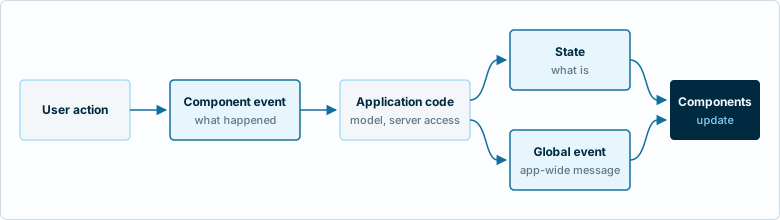
| Element | Role |
|---|---|
| Model | obtains or modifies domain data (server access) |
State |
represents the current state of the application |
| Component | presents that state |
| Event | communicates what happens between nearby objects |
| Global event | communicates what concerns the whole application |
A model is an ordinary TypeScript class, exported as a module. Views do not call the server themselves: they go through a model.
Do not add other layers until they solve a real problem.